

The three changes that produce the fastest, highest-quality lead lift from any equipment listing are: show a visible price range or monthly payment estimate, add real unit photos plus a short video walkaround with inspection proof, and embed a per-unit lead capture form with pre-filled stock details. Dealers who apply all three to their top-moving inventory typically see measurable inquiry increases within weeks, not months.
Quick-action checklist — apply to one listing in under 30 minutes:
- Add a price range or "Starting at $X" figure directly to the listing headline or top spec panel.
- Upload at least six real photos (side profile, serial plate, undercarriage, hours meter, attachments, cab interior) plus one short walkaround video.
- Replace the generic "Contact Us" link with a per-unit inquiry form pre-filled with the stock number and model.
Pro Tip: The fastest single lift usually comes from price transparency combined with a visible hours reading or recent inspection date. Both reduce perceived risk before a buyer ever picks up the phone.
Table of Contents
- Where should you list equipment and when do paid placements pay off?
- What does a high-converting listing actually contain?
- Why does pricing transparency increase lead quality?
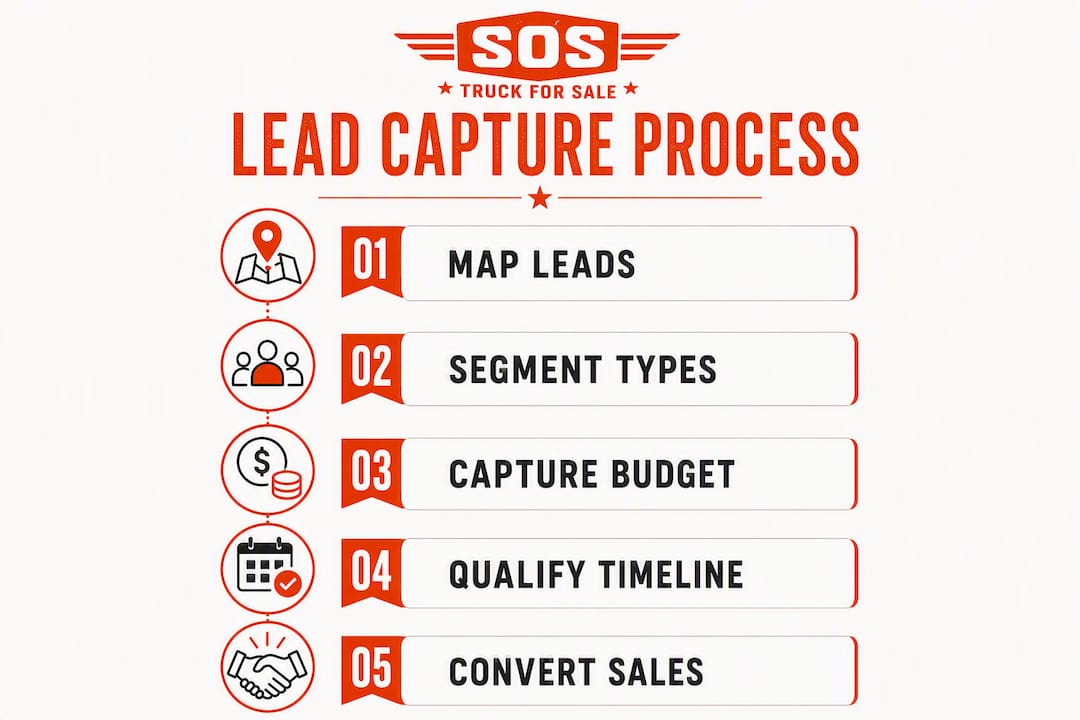
- How do you capture leads on listings and turn inquiries into sales?
- How do you syndicate listings without losing lead attribution?
- How do you measure whether listing changes are actually working?
- What trust documents do buyers expect to see on a listing?
- What does a 30/60/90-day plan to increase leads look like?
- Key Takeaways
- Why listing transparency is the foundation of every lead strategy
- Sostruckforsale helps you put these tactics to work immediately
- Useful sources and tools for implementing these tactics
Where should you list equipment and when do paid placements pay off?
Not all listing channels attract the same buyer. Specialized heavy equipment marketplaces pull buyers with high purchase intent, people actively searching for a specific machine type. Aggregator and classified sites cast a wider net but tend to attract more casual browsers. Industry directories and local dealer networks serve relationship-driven buyers who already know your brand.
Channel taxonomy at a glance:
- Specialized marketplaces (e.g., Sostruckforsale, Equipment Trader): high buyer intent, category-specific filters, often include lead forms and dealer profiles.
- Aggregator/classified sites (e.g., FleetNow): broader reach, lower average intent, useful for moving commodity inventory quickly.
- Industry directories: relationship-driven, lower volume, strong for brand credibility.
- Local dealer networks: best for regional buyers, transport-sensitive equipment, and repeat customers.
Paid or promoted placements are worth the cost in three specific situations: high-value, low-supply units where a single sale justifies the spend; urgent inventory moves where days-on-market cost you margin; and seasonal demand spikes when buyer activity is concentrated in a short window. Blanket-boosting every listing dilutes your budget without proportional return.
When evaluating any channel, compare five dimensions: total audience and monthly traffic, the cost range for promoted placements, what media and lead-form enhancements are included, how easy it is to post or syndicate inventory, and what analytics or lead-quality signals the platform provides.
Stat callout: Dealers who implement Product schema and structured inventory markup report 20–40% more quote requests without increasing paid traffic spend.
Pro Tip: Prioritize promoted spend by inventory age, margin, and lead-to-sale conversion rate. A $45,000 excavator that has sat 60 days earns a promoted placement far more than a $12,000 attachment that moves in a week.

What does a high-converting listing actually contain?
A listing that converts treats every field as a buyer question waiting to be answered. Targeted listing rewrites that address title, top stat panel, and pricing consistently produce the fastest improvements in inquiry volume.
Listing content checklist:
- Title format: Year + Make + Model + one key qualifier (hours or price). Example: 2019 Caterpillar 320 Excavator | 3,400 hrs | $89,500.
- Spec block: year, hours, serial number, attachments included, certification or refurbishment status, most recent inspection date, location, and transport readiness.
- Photos (minimum 6): side profile, front, rear, serial plate, hours meter, undercarriage, cab interior, and any attachments.
- Video: a 30–90 second walkaround showing the machine running, undercarriage condition, and hours meter reading. Real footage outperforms stock imagery every time.
- Structured data: Product schema and LocalBusiness markup let Google and AI-powered search engines parse your inventory fields directly. Optimizing for AI-powered search using structured data and context-rich descriptions can start delivering higher-quality leads within a few weeks. Tools like ListingBooster can help generate and validate schema markup without requiring a developer.
For photo compression, aim for under 200 KB per image at 1200px wide. Slow-loading pages lose buyers before the spec block even renders.
Pro Tip: Attach your inspection PDF or service log directly to the listing. Buyers who see a dated inspection summary with inspector initials ask fewer clarification questions and submit inquiries faster. Make it machine-readable: short bullets, date, and initials, not a scanned handwritten page.

Why does pricing transparency increase lead quality?
Listings without a visible price get skipped by a significant share of buyers. The psychology is straightforward: an undisclosed price signals either an inflated ask or a seller who is not ready to negotiate, and both interpretations push buyers toward listings that show their numbers.
Practical formats for showing price:
- "Starting at $X" for units with configuration variables.
- "$X + est. freight to [region]" for transport-sensitive equipment.
- Monthly payment estimate based on a stated loan term and interest assumption (e.g., "Est. $1,240/mo at 60 months, 7.9% APR — financing available").
Framing price as a monthly payment and introducing financing early keeps “not right now” prospects in the pipeline longer. A buyer who cannot commit to $95,000 today may commit to $1,400 a month. That framing creates a soft-commitment path: the buyer mentally owns the machine before they call.
A simple payment estimator embedded on each listing page does not require custom software. A static table showing three loan-term scenarios (36, 48, and 60 months) at a stated rate covers most buyer questions and removes the need for a phone call just to understand affordability.
Pro Tip: Add a visible financing pre-qualification CTA next to the payment estimate. "Check your rate in 2 minutes" captures leads who want payment options without committing to a full quote conversation. These leads are often closer to buying than they appear.
How do you capture leads on listings and turn inquiries into sales?
A generic "Contact Us" page loses context the moment a buyer clicks away from the unit they were viewing. A per-unit embedded form, pre-filled with the stock number and model, keeps that context intact and routes the lead directly to the right salesperson.
Per-unit form fields that qualify leads on submission:
- Pre-filled: stock number, model, year.
- Buyer-supplied: name, company, preferred contact method (phone or email), intent checkbox (get a quote / schedule inspection / discuss financing), best contact time, and budget range.
- Optional but valuable: job site location, decision-maker status, purchase timeline.
Replacing generic contact pages with embedded per-unit quote forms lifts conversions by removing friction. One case example showed a 30% increase in inbound quote requests after adding real photos, video, and per-unit forms to inventory pages.
Recommended follow-up sequence:
- Within 1 hour: Respond with a confirmation that includes the unit's key specs, price, and a direct calendar link for an inspection or call.
- Day 2: Send a short follow-up with the inspection summary or service history attached.
- Day 5: Route "not right now" leads into a 3-step nurture: a financing option note, a comparable unit suggestion if available, and a soft check-in at 30 days.
Map every form submission to your CRM with the intent tag intact. Lead types range from cold information requests to hot, ready-to-buy inquiries. Routing by intent tag (inspect, finance, immediate buy) lets your sales team triage high-probability leads without reviewing every submission manually.
Pro Tip: Capture budget range and timeline at submission, not during the first call. Buyers who fill in those fields are self-qualifying, and your team can prioritize the pipeline before picking up the phone.
How do you syndicate listings without losing lead attribution?
Syndicating the same unit across multiple channels multiplies exposure, but it also multiplies the risk of losing track of where your leads actually came from. A simple sequencing rule prevents most attribution problems: publish the canonical listing on your own site first, then syndicate to high-intent marketplaces, then to broader classified platforms.
Syndication best practices:
- Keep the canonical price, spec block, and contact routing on your own site. Syndicated versions can show a price range rather than an exact figure to protect negotiating room.
- Assign a unique listing ID to every unit and carry it across all platforms. This makes cross-channel lead matching possible in your CRM.
- Append UTM parameters to every syndicated URL:
utm_source=equipmenttrader&utm_medium=listing&utm_campaign=2019-cat-320. Without UTMs, you cannot tell which channel drove the inquiry. - Keep inspection documents and full service history on your own listing page. Syndicated posts can reference them ("Full inspection report available on request") to drive traffic back to your canonical page.
Pro Tip: Add a short, unique callout on each syndicated post, such as "Available for inspection at [city] by appointment, call [number]." This reduces duplicate, low-intent inquiries from buyers who are just browsing and filters for buyers who are ready to act.
How do you measure whether listing changes are actually working?
Measurement starts before you make any changes. Pull a baseline for each unit: impressions, click-through rate (CTR), inquiry rate (inquiries divided by clicks), qualified-lead rate, and time-to-close. Without a baseline, you cannot tell whether a new photo set or a price update moved the needle.
Tracking checklist:
- UTM parameters on every syndicated and paid placement URL.
- Per-listing lead-source tags in your CRM so each inquiry carries its origin channel.
- A weekly dashboard review: impressions and CTR from the marketplace, inquiry rate from your CRM, and qualified-lead rate from your sales team's notes.
Two simple A/B tests worth running:
- Price visible vs. price hidden: Take two comparable units at similar price points. Show price on one, hide it on the other. Run for 30 days or until each listing accumulates at least 50 clicks. Measure inquiry rate.
- Stock photos vs. real walkaround video: Swap stock imagery for a real walkaround video on one unit while keeping stock photos on a matched unit. Measure inquiry rate and qualified-lead rate over the same window.
| Test | Variable | Measurement window | Key metric |
|---|---|---|---|
| Price visible vs. hidden | Price display | 30 days / 50+ clicks per unit | Inquiry rate |
| Real video vs. stock photos | Media type | 30 days / 50+ clicks per unit | Qualified-lead rate |
| Schema markup on/off | Product schema | 60 days | Quote requests per impression |
Structured inventory markup correlates with a 20–40% lift in quote requests in documented case studies, making schema the highest-leverage technical change most dealers have not yet made.
What trust documents do buyers expect to see on a listing?
Buyers use inspection reports, service histories, and serial numbers as independent verification before they commit to an inquiry. These documents function as trust signals that reduce perceived risk and accelerate inquiry intent. Listings that attach inspection PDFs or service receipts see fewer clarification questions and higher qualified-lead rates.
Trust document checklist:
- Inspection report: date, inspector name or initials, pass/fail items, and any noted repairs completed.
- Service history: bullet list of maintenance events with dates and mileage or hours at service.
- Serial number verification: a photo of the serial plate alongside the listed serial number.
- Certification or refurbishment certificate for any reconditioned units.
Inspection summary template (paste directly into listing):
Inspection Date: [MM/DD/YYYY]
Inspector: [Initials / Company]
Hours at Inspection: [X,XXX]
Engine: Pass | Hydraulics: Pass | Undercarriage: [X% remaining]
Recent Repairs: [List completed work]
Full report available on request.
Service history bullet format:
- [Date] — [Hours] hrs: Engine oil and filter change, hydraulic fluid check.
- [Date] — [Hours] hrs: Track tension adjusted, undercarriage inspection.
- [Date] — [Hours] hrs: Bucket pins replaced, greased all pivot points.
Listings that treat specs, proof documents, and layout as a sales asset convert at higher rates because they answer the buyer's risk questions before the first call.
Pro Tip: Format your inspection summary as short bullets with a date and inspector initials. AI-powered search platforms and buyer tools parse structured text far better than a scanned PDF, which means your listing surfaces in more relevant results.
What does a 30/60/90-day plan to increase leads look like?
Execution without a timeline produces uneven results. This plan prioritizes the highest-impact changes first and builds toward a fully optimized, measurable listing program by day 90.
Days 1–30: Audit and quick wins
- Identify your top 10 units by margin and days on market.
- Rewrite titles to the Year + Make + Model + key stat format.
- Add a visible price range or "Starting at" figure to every unit in the top 10.
- Replace any stock photos with real unit photos (minimum 6 per unit).
- Embed a per-unit lead capture form on each of the top 10 listings.
- Add a static payment estimator table to each listing page.
Days 31–60: Media and technical upgrades
- Produce 30–90 second walkaround videos for your five highest-value units.
- Implement Product schema and LocalBusiness markup on all inventory pages.
- Launch promoted placements for two or three priority units on your primary marketplace.
- Set up UTM parameters and CRM lead-source tags for all active channels.
Days 61–90: Test, measure, and reallocate
- Run the price-visible vs. price-hidden A/B test on matched inventory.
- Run the real video vs. stock photo test on two comparable units.
- Review your weekly dashboard: reallocate promoted spend toward channels with the highest qualified-lead rate.
- Standardize your listing template across all channels using the checklist from the content section above.
Priority ranking for which units to optimize first: highest margin, longest days on market, fastest historical sales velocity, and nearest replacement schedule. Units that check three of those four criteria go to the front of the queue.
Pro Tip: Assign one team member as the "listing owner" for each unit. Accountability for photo updates, price changes, and form responses moves faster when one person owns the record, not a shared inbox.
Key Takeaways
The fastest path to more qualified equipment leads combines price transparency, real media, per-unit lead capture forms, and Product schema markup applied to your highest-margin inventory first.
| Point | Details |
|---|---|
| Price transparency first | Add a visible price range or monthly payment estimate to every listing; this single change produces the fastest lift in qualified inquiry volume. |
| Real media over stock | Six real photos plus a 30–90 second walkaround video reliably raises engagement and quote requests compared to stock imagery. |
| Per-unit lead forms | Embed a pre-filled form on each listing page; a 30% increase in inbound quote requests has been documented after adding per-unit forms alongside real media. |
| Schema markup | Product schema and LocalBusiness markup correlate with 20–40% more quote requests without additional paid traffic spend. |
| Sostruckforsale | List and promote priority units on Sostruckforsale to reach commercial and construction equipment buyers with high purchase intent across the U.S. |
Why listing transparency is the foundation of every lead strategy
Most dealers underestimate how much buyer behavior in heavy equipment has shifted toward self-service research. A buyer shopping for a $120,000 excavator today will review three to five listings in detail before contacting anyone. If your listing does not answer the price, hours, inspection status, and financing question on the page, that buyer moves to the next result. The phone call never happens.
The conventional advice is to "build relationships" and "follow up fast." Both matter, but they only apply after a buyer has already decided your listing is worth their time. The relationship starts on the listing page, not on the phone. A complete spec block, a real walkaround video, and a visible price range do more to initiate that relationship than any follow-up sequence.
There is also a structural argument for transparency that most dealers overlook. Incomplete listings attract low-quality inquiries because the only buyers who call without a price or inspection date are buyers who are still in the early research phase. Complete listings self-qualify. The buyer who submits a form after reading your inspection summary and seeing your payment estimate is already past the "is this worth my time" stage. Your sales team spends less time on dead-end calls and more time closing.
The 30/60/90-day plan in this article is not a marketing exercise. It is a systematic way to turn your existing inventory into a lead-generation program that runs without constant manual effort. The dealers who see the fastest results are the ones who treat every listing as a sales document, not a classified ad.
Sostruckforsale helps you put these tactics to work immediately
Dealers who want to apply this playbook without building a custom tech stack have a direct path: list and promote inventory on Sostruckforsale, a U.S.-focused marketplace built specifically for commercial vehicles and industrial heavy equipment, from semi trucks and trailers to excavators, cranes, and material handling machinery.
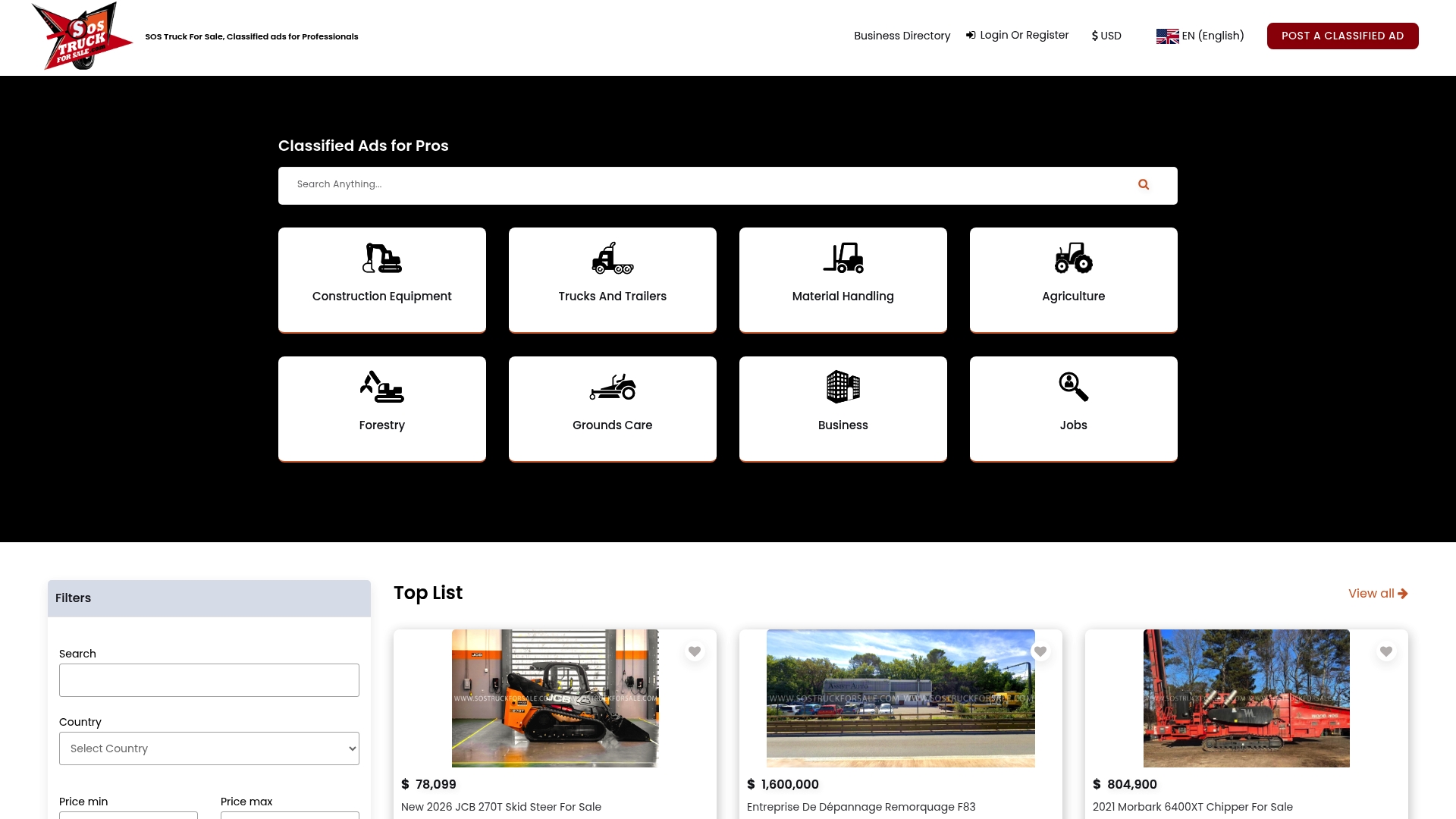
The platform supports the core tactics covered in this article: per-unit listing pages with full spec fields, photo and video uploads, a business dealer directory for brand visibility, and promoted listing options to push priority units to the top of relevant searches. Posting is straightforward, and the category structure (semi trucks, heavy-duty trucks, excavators, construction equipment, agricultural machinery, and more) means your inventory reaches buyers who are already filtering for exactly what you sell.
To get started: create your dealer account, upload your top 10 units using the listing checklist from this article, and activate a promoted placement on your two or three highest-margin units. Buyers searching for commercial and construction equipment across the U.S. are on the platform now. Post your first listing and put your inventory in front of them.
Useful sources and tools for implementing these tactics
The following resources back the findings in this article and provide practical tools for implementation:
- Equipment dealer inventory pages that actually convert buyers into leads — Synapse Edge's case-study guide on schema markup, real media, and per-unit forms. Start here for the technical side of listing optimization.
- The new equipment listing that actually converts — Equipment.link's breakdown of title rewrites, spec panels, and trust documents. Use it as a before/after reference for your listing audit.
- Improve Equipment Listing Response Rates — Equipment.link's guide to inspection documents and trust signals that reduce buyer friction.
- How to Optimize Listings for AI Search and Win More Clients — ListingBooster's guide to structured data and AI-first discovery. Relevant for dealers who want faster results than traditional SEO timelines.
- 5 High-Impact Strategies for Equipment Suppliers — GOGC's financing-framing and pipeline-retention tactics. Use it to build your payment estimator copy.
- 7 Types of Sales Leads and How to Close Them — Nutshell's lead taxonomy. Use it to set up your CRM intent tags and triage workflow.
- Lead Lists in 2026: Build, Buy, or Outsource? — Martal's ICP-definition playbook. Useful for dealers building outbound prospecting alongside inbound listing leads.
- Google Rich Results Test (search.google.com/test/rich-results) — Validate your Product schema markup before publishing. Free, no account required.
- Handbrake (handbrake.fr) — Free video compression tool. Use it to reduce walkaround video file size before uploading to listing pages.
- Mortgage/loan calculator widgets (e.g., Bankrate's embeddable calculator) — Adapt for equipment payment estimates. Most allow custom loan amounts, terms, and interest rates with a simple embed code.