

Equipment listing categories are the labeled groupings, application-first buckets like earthmoving, material handling, and lifting, that organize a fleet or marketplace inventory for search, maintenance planning, and procurement. The taxonomy that works best starts with six top-level groups: earthmoving, material handling, lifting and access, transport, agricultural and forestry, and specialty or attachments. Everything else, from data fields to CMMS mapping, builds on that spine.
TL;DR:
- Proper categorization based on job-specific terminology significantly improves listing visibility and reduces inquiry drop-off for buyers and technicians.
- Organizing equipment into ten industry-standard groups with appropriate subcategories and tags ensures accurate searchability across diverse machinery types.
- Maintaining consistent, complete data fields, including photos, serial numbers, and condition reports, is essential for high-quality listings and streamlined asset management.
- Separating equipment categories from asset location data in a linked CMMS structure prevents confusion and supports efficient asset tracking and maintenance.
- Implementing a structured, step-by-step process for inventory listing and regular verification helps maintain taxonomy accuracy and reduces operational friction.
Table of Contents
- Why Correct Categorization Matters for Equipment Listings
- A Practical Category Set for Heavy and Industrial Equipment
- What Fields Belong in Every Equipment Listing?
- How Do Categories Map to a CMMS Asset Hierarchy?
- Building the Inventory: A Five-Step Workflow
- Listing Quality Signals That Reduce Buyer and Technician Doubt
- How SoSTruckForSale Applies This Taxonomy in Practice
- Where to List Equipment Using This Taxonomy
- Sources
Why Correct Categorization Matters for Equipment Listings
Buyers and technicians don't search the way your spreadsheet is organized. They search by job: "skid steer for snow removal," not "compact track loader, subcategory 4B." Category placement determines who actually sees a listing, and mismatched labels quietly kill inquiry quality and conversion, according to equipment listing response research. The same logic applies inside a facility. If maintenance techs search a CMMS by function and your taxonomy is organized by purchase order number, you've built a system nobody uses.
Design your categories around three rules. First, name categories by application or job, not internal jargon, so "lifting and access" beats "vertical elevation assets." Second, keep the structure hierarchical where equipment truly nests (excavator > mini excavator > 5,000 lb class), but layer in faceted tags for attributes that cut across categories, like "electric" or "rental-ready." Third, use subcategories for structural distinctions (size class, powered vs. unpowered) and reserve tags for cross-cutting traits that don't fit a strict hierarchy.
- Prioritize buyer and technician vocabulary over internal codes when naming top-level categories.
- Keep names actionable and job-specific rather than abstract or engineering-driven.
- Use subcategories for permanent structural traits; use tags for flexible, cross-category attributes.
- Allow multi-labeling for attachments and multi-role machines instead of forcing a single category.
A Practical Category Set for Heavy and Industrial Equipment
Ten categories cover the vast majority of heavy and industrial fleets, and they map cleanly to how heavy equipment is typically grouped by job type across the industry.
- Earthmoving: excavators, bulldozers, wheel loaders, graders, backhoes.
- Material handling: forklifts, telehandlers, conveyors, stackers.
- Lifting and access: cranes, boom lifts, scissor lifts, aerial platforms.
- Transport and trucks: semi trucks, dump trucks, flatbeds, trailers.
- Paving and compaction: pavers, rollers, compactors, milling machines.
- Agricultural: tractors, combines, sprayers, balers.
- Forestry: feller bunchers, skidders, chippers, mulchers.
- Mining: haul trucks, drills, crushers, draglines.
- Attachments and implements: buckets, augers, grapples, forks, blades.
- Specialty and rentals: generators, compressors, light towers, temporary power.
Within each category, split subcategories by size class and drivetrain, since a 3-ton mini excavator and a 40-ton crawler excavator serve wildly different jobs even though both are "excavators." Crawler versus wheeled configuration matters too, as does powered versus unpowered for trailers and attachments. For a deeper dive on how one equipment family breaks down by configuration, our bulldozer types guide shows the pattern you can replicate across other categories.
Attachments and multi-role machines are where taxonomies usually fall apart. A skid steer with a snow blower, a brush cutter, and a pallet fork isn't three machines. List it once under its primary category, then tag every attachment it supports so a search for "brush cutter" still surfaces it.
What Fields Belong in Every Equipment Listing?
A category only works if the listing behind it carries consistent data. High-converting listings follow a predictable structure: a rigid title formula, complete specs, and photo documentation that leaves no gap for buyer doubt, according to seller guidance on heavy equipment listings. Facility teams should treat internal asset records the same way.
Minimum required fields:
- Unique ID — a stable identifier that never gets reassigned, even after disposal.
- Title, formatted as Year Make Model KeySpec (example: "2019 Caterpillar 320 Excavator, 5,200 hrs").
- Serial number, VIN, or data-plate ID — copied exactly, not paraphrased.
- Hours or mileage as of the last recorded check.
- Location, both physical site and functional location code.
- Condition or grade using a consistent scale (excellent, good, fair, needs repair).
- Key specs: engine size, lift or load capacity, bucket size, whatever defines the category.
- Attachments linked or tagged to the parent record.
- Photos: hero shot, data-plate close-up, and visible wear points.
Optional fields that materially change decision-making include service history, inspection reports, OEM part numbers, warranty status, transport notes, and a price range for insurance or resale purposes. Hours and condition feed maintenance planning directly; part numbers shorten procurement lead time; service history and inspection reports support depreciation schedules and audit trails. Skip these and every downstream process, from spare parts ordering to insurance valuation, runs on guesswork.
How Do Categories Map to a CMMS Asset Hierarchy?
A marketplace category and a CMMS record answer different questions. The category answers "what kind of machine is this?" The functional location answers "where does this machine live and work?" Confusing the two is why facilities end up with duplicate asset records for the same excavator listed under three different site codes.
Keep functional location and equipment record separate but linked. Functional location is the address (Site A, Yard 3, Bay 12); the equipment record is the machine itself, and it can move between locations without losing its identity.
- Structure parent/child grouping as machine → major assembly → attachment (excavator → hydraulic pump → grapple attachment).
- Use a stable unique-ID pattern that embeds site code, functional-location code, and asset sequence, something like SITE-AREA-0001, so IDs never collide and parent/child links stay intact.
- Standardize naming so a search for "CAT 320" returns every unit regardless of who entered the record.
- Avoid free-text category fields; use a locked dropdown tied to your top-level taxonomy to prevent drift.
Get this mapping wrong once and it compounds. Every new technician who can't find "the excavator in Bay 12" adds friction to a system that should take five seconds.
Building the Inventory: A Five-Step Workflow
Rolling out a new taxonomy across an existing fleet is a project, not a weekend task, but it breaks into five manageable steps with clear ownership.
- Plan scope and templates. The asset manager defines which categories apply to the fleet and builds the spreadsheet or CMMS template before anyone touches a machine.
- Walk the yard and assign unique IDs. A data specialist or maintenance lead physically walks every unit, assigning IDs on the spot so nothing gets missed or double-counted.
- Capture fields, photos, and documents. Record hours, condition, specs, and the mandatory photo set, hero image, serial plate, hour meter, wear points, and attachment serials, since those five images resolve most buyer and maintenance questions later.
- Import into the CMMS or database and map categories. Bulk CSV import works well here; just validate category names against your locked taxonomy before the file loads.
- Set a verification cadence. Quarterly spot checks catch drift long before it becomes a full re-audit.
Pro Tip: *Run the QA check as a mismatch report, not a full re-walk.
Listing Quality Signals That Reduce Buyer and Technician Doubt
A short checklist separates listings that generate confidence from ones that generate follow-up questions nobody wants to answer. Complete specs, wear-point photos, and service history measurably reduce buyer uncertainty and lift conversion, according to research on buyer expectations for equipment listings.
- Title follows the Year Make Model KeySpec standard, no exceptions.
- Serial plate photo is legible, not a blurry afterthought.
- Wear points and known issues are photographed, not just described.
- Service records or inspection reports are attached or referenced.
- Price or valuation range is stated, not left as "call for quote."
Each item on that list does double duty. It builds buyer trust on a marketplace listing and builds internal confidence during a maintenance audit, since the same photo that reassures a buyer also tells a technician exactly where to check for cracks before signing off on a work order.
How SoSTruckForSale Applies This Taxonomy in Practice
Dealers who list on SoSTruckForSale see the taxonomy problem from the buyer side first. A listing that buries a crane under "miscellaneous equipment" gets fewer qualified inquiries than one filed under "lifting and access" with a proper title and serial photo, and that gap shows up directly in response rates. Sellers who treat premium units differently from commodity inventory, adding inspection reports and certification for high-value machines, cut buyer hesitation on the units where it matters most, a distinction supported by research on commodity versus premium equipment segmentation. If you're weighing what "heavy equipment" even covers before you start categorizing, our types and applications guide is a useful starting reference before you lock in a taxonomy.
Where to List Equipment Using This Taxonomy
If you've built the taxonomy and the data schema, the next question is where to put it to work. Sostruckforsale is the marketplace built for exactly this: application-first categories, dealer directories, and listing structures that reward the title formula, serial documentation, and photo standards covered above.
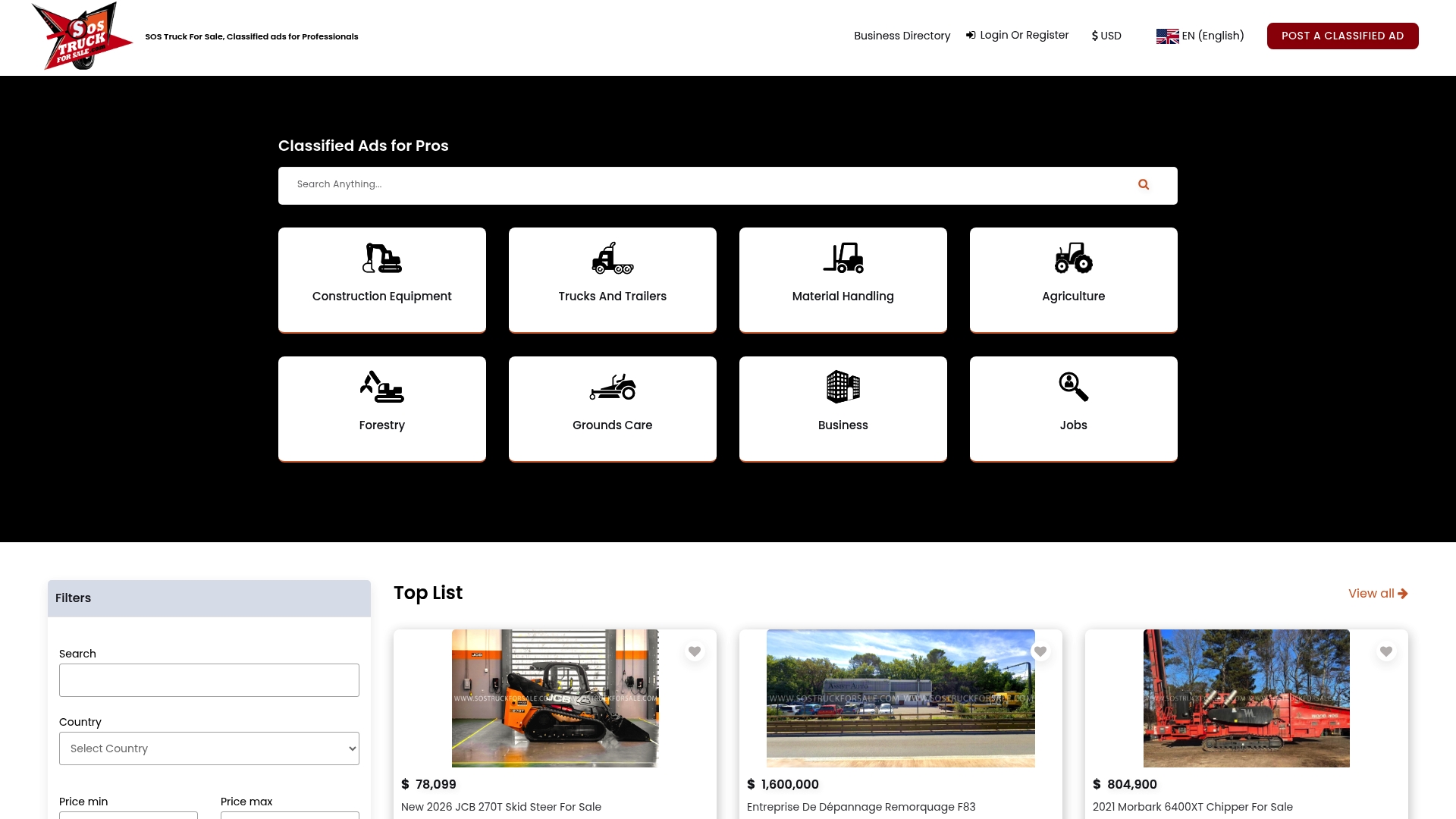
Facility teams disposing of surplus equipment, and dealers managing active inventory, can post directly to categories that match buyer search behavior instead of internal jargon. Before you list your next excavator, crane, or fleet truck, review how to sell heavy equipment without leaving money on the table and make sure your title, photos, and specs meet the standard buyers expect. When you're ready, post your listing on Sostruckforsale and apply the category structure directly to a live audience of buyers searching by job, not jargon.
Sources
- Improve Equipment Listing Response Rates
- High-Converting Heavy Equipment Listings: Seller Guide to Online Sales
- 36 Types of Heavy Equipment: Names, Uses, Pictures & AKA Terms • Heavy Equipment Appraisal