
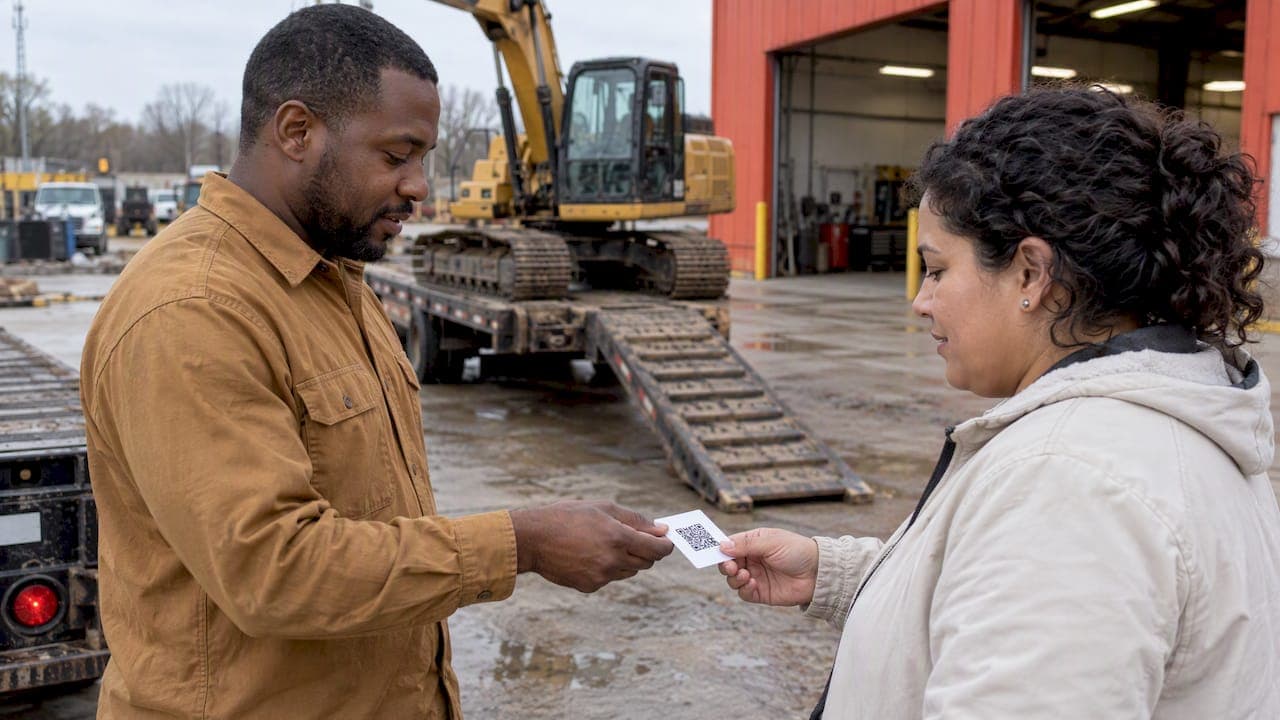
A good dealership reviews strategy is a repeatable routine, not a one-time push. Ask at the moments when the customer is most satisfied, make the review one click away, answer every low rating personally, stay inside the FTC and Google rules, and track a few numbers every month. Equipment buyers spend six figures on a truck or an excavator and often have never met the seller, so a visible record of how you treat customers does real selling work before the first phone call.
This guide is written for heavy equipment, truck and machinery dealers, not for car lots. The triggers are different (delivery, service work orders, parts counter, rental returns), and so are the buyers.
TL;DR
- Ask for the review at a defined trigger: delivery, a completed service work order, a parts pickup or a rental return. Do it the same day, while the job is fresh.
- Send a direct Google review link or QR code by text or email. Every extra click costs you reviews.
- Never offer a reward tied to a positive review. The FTC and Google both prohibit it.
- Answer low ratings personally and privately offer to fix the problem. Automate only the simple thank-you replies to five-star reviews.
- Track review volume, response time and rating by location, then read the text of the reviews for patterns.
Table of Contents
- Why reviews matter more when the ticket is large
- Decide when you ask: the trigger list
- How to ask: wording and channels
- Stay inside the rules
- Monitor every platform in one place
- Respond to every review the right way
- Read reviews as a pattern, not a pile
- Metrics that show whether it is working
- Our view: reviews are a system, not a campaign
- Put your inventory where buyers are looking
- FAQ
- Sources
Why reviews matter more when the ticket is large
A consumer picking a restaurant can afford a bad guess. A contractor buying a used dump truck or a fleet manager ordering a trailer cannot. Before they call, they check who you are, how long you have been around and what other buyers say about delivery, paperwork, warranty follow-through and service after the sale.
That is why reviews belong in the same plan as your inventory and lead handling. A complete dealer profile and clean listings bring buyers to your door. Reviews help decide whether they pick up the phone. The same logic applies in neighboring trades: owners vetting an underground contractor look for proof of past performance, as explained in this piece on HDD contractor selection for owners. Equipment buyers do the same with dealers.
There is a second benefit. Reviews are free market research. Customers tell you in their own words what you do well and where deals fall apart. More on that below.
Decide when you ask: the trigger list
The most common reason a dealership has few reviews is simple: nobody asked, and nobody was assigned to ask. The fix is to tie the request to specific events in your normal workflow rather than to someone's memory.
The Daniel Group, which runs customer experience programs for equipment dealers, suggests triggering feedback right after specific moments: equipment delivery, scheduled maintenance, repair or unscheduled service, parts-counter visits, rental returns and annual account reviews. Its guidance for service is to send an automated survey after every service work order, by phone, text or email depending on the customer base.
For a heavy equipment or truck dealer, a practical trigger list looks like this:
| Moment | Who asks | Channel | Timing |
|---|---|---|---|
| Unit delivered or picked up | Salesperson | Text with review link | Same day, after the customer has seen the machine run |
| Service work order closed | Service advisor or technician | Text or email | Same day |
| Parts counter order | Counter staff | Receipt QR code or email | At pickup or shipment |
| Rental return | Rental coordinator | Within a day of a clean return | |
| Annual account review | Account manager | Call, then link | At the meeting |
Pick the triggers that match your business and drop the rest. Three that run every time beat six that run when someone remembers.
Plant the seed before the sale closes
WC&P Online recommends introducing the idea during the sales call, telling the new customer you will follow up after they have used the product, and then asking for the review during that follow-up once satisfaction is established. Generator Marketing Solutions makes a similar point for installation and service work: have technicians mention it on the job, follow up with a personal call where it helps, and hand over review cards or QR codes.
The same source treats review generation as a team responsibility. Your drivers, technicians, parts staff and sales reps all see the customer at their best moment. If only the owner asks, you will get a trickle.
How to ask: wording and channels
Keep the request short, conditional and human. Fieldmotion suggests asking whether the customer would leave a quick Google review if they were happy, explaining that it helps others find the business, and avoiding stiff, formal language. Its advice on timing: ask right after the job, then follow with a same-day thank-you text or email that carries a direct review link. For maintenance contracts, a successful inspection or contract check-in is another natural moment.
A text that works for a delivery might read:
Thanks for picking up the 2019 tri-axle today, Mike. If you're happy with how it went, would you leave us a quick Google review? It helps other contractors find us. Link: [your link]
That message names the customer and the unit, makes the ask conditional on satisfaction, and puts the link right there.
Remove every click you can
Google's own guidance is to request reviews with a direct link or QR code from your Business Profile, which you can place on receipts, in thank-you emails or at the end of chat conversations. WC&P Online adds invoices, mailers, business cards, websites and social profiles to the list. Put a QR code on the service invoice, the delivery paperwork and the parts counter. Keep one standard link in every salesperson's text templates.
Some dealers automate the request. Kenect, for example, describes automated review requests after equipment purchases, service visits, rentals or parts transactions, so the ask becomes part of the transaction workflow instead of a favor someone remembers to do. Whether you use a tool or a spreadsheet and a calendar reminder, the principle is the same: the request fires on an event, not on a mood.
Stay inside the rules
This is where well-meaning dealers get into trouble. Two sets of rules matter in the U.S.: the federal rule and each platform's policy.
The FTC rule
The FTC's Consumer Reviews and Testimonials Rule, in effect since October 2024, prohibits buying or selling fake reviews, using physical intimidation or unfounded legal threats to suppress reviews, and conditioning an incentive on a particular sentiment. In FTC guidance, incentives are not banned outright when no positive or negative sentiment is required, but failing to disclose them may violate the FTC Act.
In practice for a dealer:
- Do not write reviews yourself, have staff write them, or pay anyone for them.
- Do not threaten a customer with a lawsuit to get a review taken down unless the threat is genuine and grounded.
- Do not say "we'll take $100 off your next service if you leave five stars." That ties the reward to a sentiment.
- Do not ask only your happiest customers in a way that screens out unhappy ones from the platform if you are promising an incentive. Ask everyone the same way.
If you are considering any reward program, talk to your attorney before launching it. The disclosure question is a legal one, not a marketing one.
Google's policy
Google's Business Profile guidance is stricter than many dealers expect. It prohibits offering incentives, such as discounts or free products, in exchange for posting, changing or removing reviews. This is treated as fake engagement and can lead to penalties on your profile. The simplest policy for your team: no gifts, no discounts, no raffle entries for reviews. A sincere request and an easy link are the whole method.
Monitor every platform in one place
Dealers with a single lot can check Google, Facebook and industry directories by hand every morning. Multi-location dealers cannot. One equipment dealer case study from Vendasta describes centralizing review activity for every location in one dashboard, automating responses to five-star reviews, and having staff personally read and answer lower-rated ones. The split is sensible whatever tool you use: let software handle the easy thanks and keep people on the hard conversations.
A simple monitoring setup:
- List every place your dealership can be reviewed: Google Business Profile for each location, Facebook, and any directory or marketplace profile.
- Assign one owner per location who checks daily and a backup for vacations.
- Route new reviews of three stars or lower to a manager the same day.
- Review the whole picture weekly in a short meeting, not just the stars.
If you list inventory on a marketplace, make sure your business profile is filled in there too, since buyers who see your listings often want a second look at who you are. Our guide to getting more leads from equipment listings covers how listings and profile work together.
Respond to every review the right way
Negative reviews
Google's guidance for owners responding to critical reviews is to acknowledge the feedback, protect the customer's privacy, avoid personal attacks and invite the reviewer to contact you privately to resolve the specific concern. Before you answer, do your homework: find out what happened, talk to the technician or salesperson involved, and pull the work order.
A workable reply has four parts:
- Thank them and name the issue in a neutral way.
- Apologize for the experience where it is warranted, without admitting facts you have not checked.
- Give a direct contact, a named person and a phone number.
- Keep it short. Never argue the details publicly, and never include invoice amounts, serial numbers or other customer data.
Example: "Thanks for telling us about the delay on your hydraulic hose repair. That is not the turnaround we aim for. Please call Sandra, our service manager, at the number on your work order so we can look at it together."
Positive reviews
Thank the customer by first name and mention something specific, such as the delivery, the technician or the machine. Google's guidance frames owner replies as relationship-building, closer to a friend than a salesperson, so share a relevant fact rather than a promotion. A reply that pitches a new promotion on someone else's praise reads badly.
How fast
Speed signals attention. Aim to reply to negative reviews as soon as you have the facts, ideally within a business day, and to positive ones within a few days. You do not need to comment on literally everything. TrustRadius, in its guide to B2B reviews, notes that vendors need not answer every review but should comment fairly regularly on both positive and negative ones. For a dealership with a manageable volume, answering all of them is realistic and worth it.
The same discipline applies to buyer inquiries. A dealer who replies quickly to a lead and quickly to a complaint builds one reputation. See how to reply to hot equipment leads in 5 minutes.
Read reviews as a pattern, not a pile
Most dealers read reviews one at a time, feel good or bad, and move on. The real value shows up when you read fifty at once. Once a month, export or copy the last 30 to 90 days of reviews into a sheet and tag each one.
Useful tags for an equipment dealer:
- Department: sales, service, parts, rental, finance, delivery.
- Theme: communication, accuracy of the listing, condition versus description, price transparency, turnaround time, paperwork and title, warranty follow-up.
- Sentiment: positive, mixed, negative.
- Named staff: who gets praised, who keeps appearing in complaints.
Then ask what repeats. Three patterns to look for:
- Condition versus description. If customers say the unit was not as described, the fix is in your listing, not your sales pitch. Better photos and complete fields help, and our listing template with a photo checklist and notes on overlooked listing fields show where to start.
- Slow answers. If reviews say "took days to hear back," your lead process is leaking buyers before it leaks stars.
- Praise for a specific person or step. Turn it into a standard. If customers love your delivery walkthrough, make it mandatory for every unit.
The words customers use are also marketing copy. If several people call your service team "honest about what needs fixing," that belongs in your dealer profile and on your site, with the customer's permission and in line with the FTC rule above. Do not edit or invent testimonials.
Compare review themes with your inventory and lead data too. If one product category generates inquiries but also complaints about condition, tighten that category's inspection and listing standards. Our overview of commercial vehicle listing analytics shows what to watch on the lead side.

Metrics that show whether it is working
Keep the dashboard small. Vendasta's multi-location dealer guidance says to track response time and review volume regularly and to report location-level performance separately from the brand average. That last point matters: a strong flagship rating can hide a weak branch.
A monthly scorecard for each location:
| Metric | What it tells you | Simple target to set |
|---|---|---|
| New reviews per month | Whether the asking routine runs | A number tied to your monthly deliveries and work orders |
| Share of transactions that produce a review | How well triggers work | Set your own baseline, then improve it |
| Average rating, last 90 days | Current experience, not history | Track the trend, not just the level |
| Response time to negative reviews | Whether problems get attention | Same business day where possible |
| Share of reviews answered | Discipline | All of them for small volumes |
| Top three complaint themes | Where to fix operations | Fewer repeats each quarter |
The second row is the most useful for diagnosing the plan. If you close 40 deliveries and service jobs a month and collect two reviews, your trigger is failing, not your customers.
Do not chase a perfect 5.0. A mix of ratings with sensible replies reads as real. Chasing perfection tempts people toward the practices the rules above forbid.
Our view: reviews are a system, not a campaign
We run a marketplace for commercial and industrial equipment, and we see what separates dealers who earn trust from dealers who only advertise. The dealers who do well treat every touchpoint as part of the same process: a complete profile, accurate listings with good photos, fast replies to inquiries, and a clear way for customers to say how it went. None of these steps is dramatic. Together they show a buyer that real people stand behind the machine.

Our advice is to start small. Choose two triggers, delivery and service completion. Write one text template and print one QR code. Assign one person per location. Run it for 90 days and read what customers write. Only then add automation or more triggers. A dealer who does this steadily will outpace a competitor who launches a big review contest, gets a spike of ratings and then goes quiet.
And please skip the shortcuts. Buying reviews or trading discounts for five stars puts your Google profile and your legal standing at risk, and buyers of heavy equipment are good at spotting reviews that sound the same.
— Dave
Put your inventory where buyers are looking
Reviews build trust, but buyers still need to find your units first. Sostruckforsale is a marketplace built for commercial and industrial equipment, with listings across construction equipment, trucks and trailers, material handling, agriculture, forestry and grounds care. Dealers can register a business profile and post listings that buyers filter by category, price and country. Pair a strong profile with a steady review routine, and the buyer who finds your unit also finds proof that you deliver. If you manage your stock through a feed, see our inventory feed setup guide, and for the wider operating picture read commercial truck dealer best practices.
FAQ
When is the best time to ask an equipment customer for a review?
Ask right after a successful event, such as delivery, a closed service work order or a parts pickup, while the experience is fresh. A same-day text or email with a direct review link works well. For maintenance contracts, a good inspection or contract check-in is another natural moment.
Can I give customers a discount for leaving a review?
No. Google prohibits offering incentives such as discounts or free products in exchange for posting, changing or removing reviews, and the FTC rule bars tying incentives to a positive or negative sentiment. Ask sincerely, make it easy and leave rewards out. For any other incentive idea, check with your attorney first.
How should I answer a bad review?
Thank the reviewer, acknowledge the specific issue without arguing, keep customer details private and invite them to contact a named person offline. Check the facts with your team before you reply. Reply as a friend would, not as a salesperson, and leave promotions out.
Do I need to reply to every review?
You are not required to, and some B2B guidance says commenting regularly on both positive and negative reviews is enough. For most dealerships, though, the volume is small enough to answer all of them, and that shows buyers you pay attention. Prioritize negative reviews first.
Which numbers should I track?
Start with review volume, response time, average rating over the last 90 days and the share of transactions that produce a review. If you have several locations, report each one separately from the company average. Add a monthly tally of complaint themes to find what to fix.
Sources
- The Daniel Group: Customer Experience Programs for Equipment Dealers
- WC&P Online: 6 Tips to Get More Reviews and Increase Consumer Trust
- Generator Marketing Solutions: How Generator Dealers Can Take Control of Their Online Reputation
- Fieldmotion: How to Ask Customers for Reviews, Testimonials, and Feedback
- Google Business Profile Help: request reviews with a link or QR code
- Google Business Profile Help: tips for getting and answering reviews
- Kenect: Text Messaging and Payments for Equipment Dealers
- FTC: The Consumer Reviews and Testimonials Rule, Questions and Answers
- Vendasta: AI reputation specialist for a multi-location equipment dealer
- Vendasta: Multi-Location Review Management
- TrustRadius: The Definitive Guide to B2B Reviews